Why is evaluating a SLAM algorithm so hard?
Ask a robotics team how well their localization works and you will usually get a number. Ask how they got it, and the answer gets fuzzier: a launch file someone tweaked, a bag file on a laptop, a script nobody dares to touch.
Benchmarking SLAM and localization should be routine. In practice, it rarely is:
- Hand-built setups. Different launch files, scripts and bags for every experiment.
- Hard to reproduce. Which parameters, which dataset and which version produced that number?
- Rigid frameworks. Full benchmarking suites ask you to reshape your algorithm to fit them.
- Shaky conclusions. Decisions that are hard to justify, hidden regressions and repeated work.
At Ekumen we ran into all four while building Beluga, our particle-filter localization library. This post introduces LAMBKIN, the open-source tool we built to make benchmarking boring, in the best sense of the word.
What is LAMBKIN?
LAMBKIN stands for Localization And Mapping BenchmarKINg. It is a Python SDK for building SLAM evaluation pipelines that are reproducible and structured by design. Its philosophy fits in one line:
You bring the algorithm. LAMBKIN handles the rest.
Your algorithm runs as an external process, so LAMBKIN does not need to know what is inside it. Beluga, Nav2 AMCL or something you wrote last week: it is all the same to LAMBKIN. What it handles is the plumbing around it: parameter sweeps, launching and stopping processes, feeding inputs and collecting outputs in a predictable layout.
It does not try to replace your measurement tools either. A tool like evo computes trajectory error metrics such as APE (Absolute Pose Error: how far the estimated pose is from the ground truth). Your tools measure; LAMBKIN orchestrates. LAMBKIN already knows how to read evo’s results, and any other tool with a command-line interface plugs in the same way.
This is actually the second version of LAMBKIN. The first one glued together a long list of open-source tools into reproducible pipelines, and it powered our Beluga vs. Nav2 AMCL validation and likelihood field investigation. Over time, though, it became slow and storage hungry, and several of its dependencies were abandoned by their maintainers. So we started over: LAMBKIN-ng is a single pure-Python package with few dependencies, where benchmarks are written as code, in the spirit of pytest and click. The original version remains in the lambkin-classic branch.
A benchmark is just a Python script
Let’s make it concrete. Say we want to know how Beluga AMCL behaves with two sensor models (beam and likelihood_field) and three particle counts (10, 20 and 100). That is six configurations, and we want to run each one twice. With LAMBKIN, the whole benchmark looks like this:
import matplotlib.pyplot as plt
import lambkin

@lambkin.benchmark(
    variants=lambkin.common.named_product(
        sensor_model=["beam", "likelihood_field"],
        num_particles=[10, 20, 100],
    ),
    num_iterations=2,
)
def nominal(ctx):
    # Record everything while Beluga runs on the dataset
    with lambkin.process.background(
        ctx.shell.ros2.bag.record, "--output", "output", "-a"
    ):
        with lambkin.process.background(
            ctx.shell.ros2.launch, "beluga_ros2", "beluga.launch.py",
            f"sensor_model:={ctx.variant.sensor_model}",
            f"num_particles:={ctx.variant.num_particles}",
        ):
            ctx.shell.ros2.bag.play(ctx.inputs.dataset)

    # Measure with evo, as an external command
    ctx.shell.evo_ape.bag2(
        "output", "/ground_truth", "/pose",
        "--save_results", "output.ape.zip",
    )

@nominal.input
def dataset(ctx):
    return "/data/datasets/input"

@nominal.output
def plot(ctx):
    fig, ax = plt.subplots()
    for e in lambkin.data.evo.stats(ctx, "output.ape.zip"):
        ax.scatter(e.rmse, str(e.variant))
    fig.savefig(ctx.base_dir / "plot.png")
Adapted from the full example in examples/beluga, which comes with its own Docker setup.
Then you just run it with lambkin beluga_benchmark.py. Here is what LAMBKIN takes care of so you don’t have to:
- The sweep.
named_productexpands every combination andnum_iterationsrepeats each one: 6 variants × 2 iterations = 12 runs, declared in five lines. Flags like--show-variants,--variants 1,3:5and--dry-runlet you inspect or narrow it down before running anything. - The processes.
ctx.shellturns any executable into a Python call, andprocess.backgroundkeeps a process alive for the duration of a block. Nested blocks read naturally: the outer one records, the inner one runs Beluga. - The cleanup. ROS 2 nodes love spawning child processes, and a leftover node from one run can quietly pollute the next. LAMBKIN puts each run inside its own Linux cgroup v2, a kernel-enforced box around every process it starts. When the run ends, everything in the box goes, no exceptions.
- The inputs.
@nominal.inputhooks resolve data once per benchmark, per variant or per iteration, whichever fits. - The restarts. Every run is recorded with its metadata. If the benchmark dies halfway, re-running it skips what already finished.
- The results. Outputs follow a predictable structure: one folder per variant and iteration, with logs and metadata next to each artifact.
lambkin.datareads them back, from the@outputhook or from a notebook months later.
What you get
Running that script gives you 12 runs. When the sweep finishes, the @output hook is called once and goes through all of evo’s results to build the plot. Here is an animated version of it:
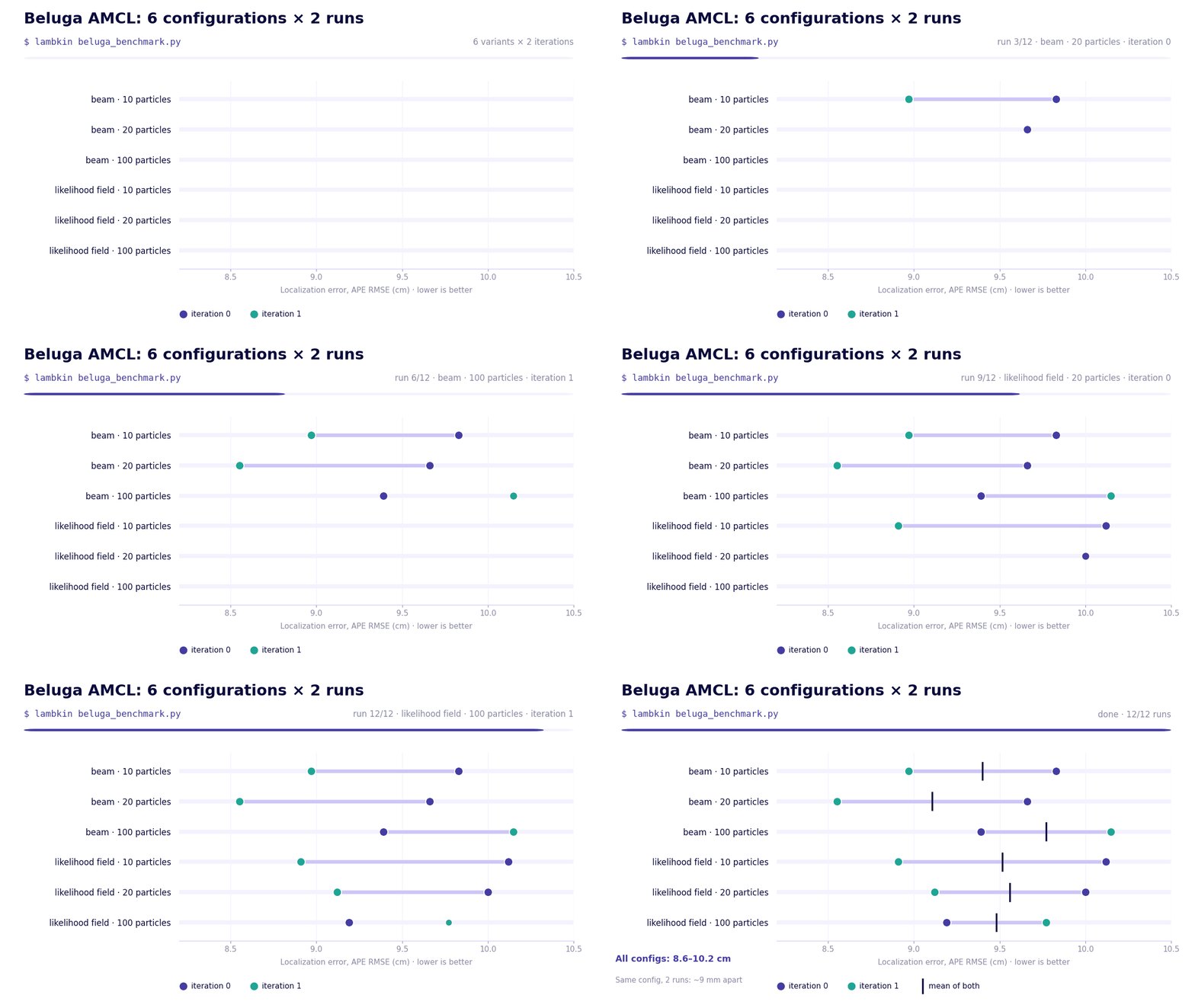
Every configuration keeps the robot within 8.6 to 10.2 cm of the ground truth. On average, the best and worst configurations are only about 7 mm apart, so for this dataset Beluga AMCL behaves consistently across both sensor models and all three particle counts.
Two iterations are enough to show the picture, but not to pick the best configuration: two runs of the same configuration differ by about 9 mm, more than the gap between configurations. To settle that, you change num_iterations=2 to num_iterations=30 and run the same script again.
Use cases
Because a benchmark is just code, the same script covers different use cases, usually with a single change:
- Tuning. Sweep
num_particles=[100, 500, 1000, 5000]with 30 iterations to find the setting that optimizes a metric. - Different datasets. Make the dataset a variant (
dataset=["warehouse", "office"]) and scope the input hook to the variant with@nominal.input(scope="variant"). - Different algorithms. Add
algorithm=["beluga", "nav2_amcl"]and dispatch onctx.variant.algorithm. Same data, same iterations, same evaluation. - Regression tests. Run the same sweep on every release and compare the stats against a reference.
What’s next
LAMBKIN-ng is already in use in Ekumen projects, and it is the benchmarking harness for Beluga 3.x, the next major version of Beluga, now in development. Next on the roadmap are parallel execution, CPU and memory metrics per process, remote datasets and native mapping and navigation metrics.
Try it
If you remember three things from this post, make it these:
- Your benchmark is a Python script, not infrastructure.
- Your tools (like evo) measure; LAMBKIN orchestrates.
- Reproducible, with no stray processes, by design.
All you need is Python 3.10+, uv and Linux with cgroup v2:
uv tool install git+https://github.com/Ekumen-OS/lambkin
lambkin my_benchmark.py
Useful links:
- LAMBKIN on GitHub (Apache-2.0)
- SDK documentation and CLI reference
- Beluga AMCL example, ready to run with Docker
- Beluga and evo
Contact us
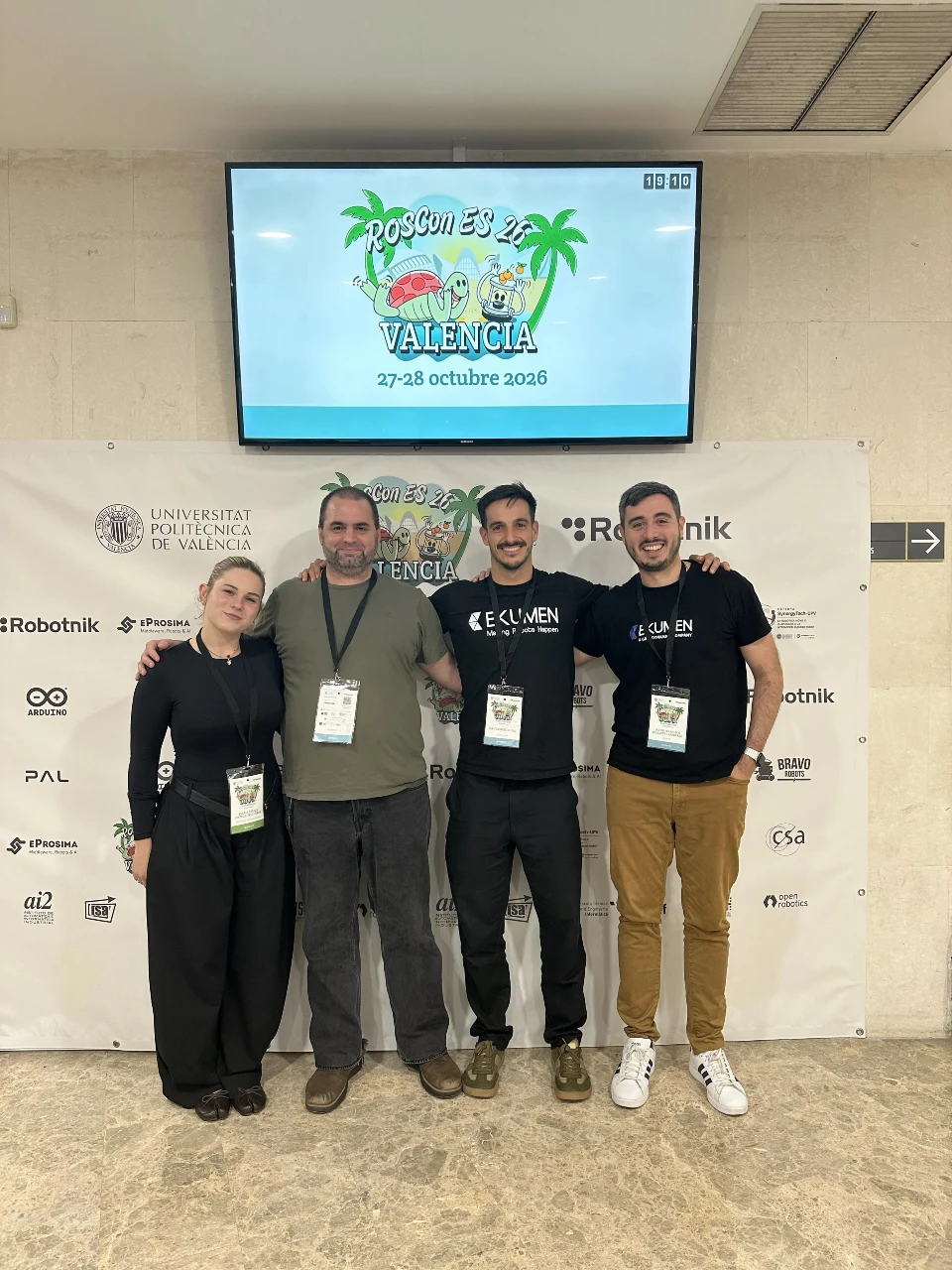
We presented LAMBKIN at ROSCon Spain 2026 in Valencia.
We hope LAMBKIN makes your next benchmark a little less painful. If you try it, find a bug or have a use case we haven’t thought of, open an issue on GitHub or reach out to us. We’d love to hear how you benchmark your robots. If you’d like a hand benchmarking or tuning your own localization stack, our team can help.